Integrations
The Integrations section allows you to connect supported third-party platforms directly to your Kwik account.
These integrations automate the flow of data between Kwik and your external systems, reducing manual data capture and reconciliation work.
Supported Integrations
Currently accounting integrations include:
- Xero
- Sage
- QuickBooks
- Zoho Books
Additional integrations will be added over time.
Creating an Integration
Select Create to add a new integration.

You will be presented with a list of available integrations.
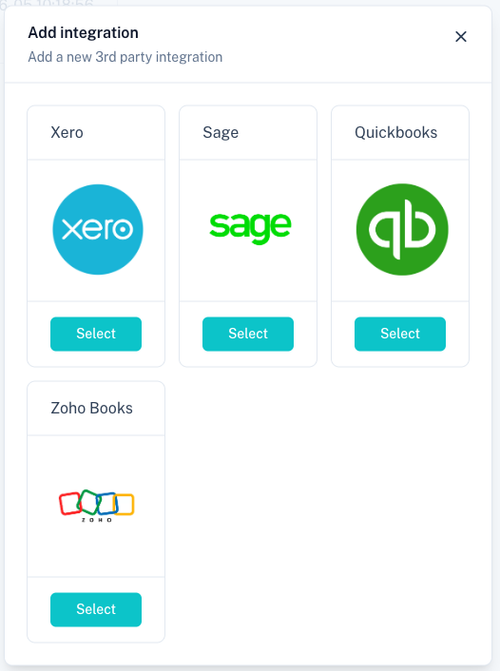
Select the integration you would like to connect and follow the on-screen instructions.
Connecting an Integration
The connection process varies depending on the provider selected, but generally follows the same steps:
- Select the integration provider.
- Sign in to your external account.
- Grant the required permissions.
- Authorise the connection.
- Complete any provider-specific configuration steps.
- Save the integration.
Once connected, the integration will appear in the integrations list.
Integration Status
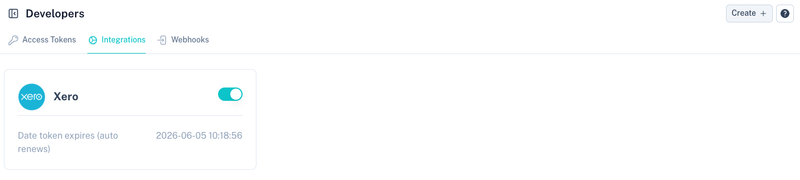
Connected integrations display their current connection status and token expiry information.
Typical information displayed includes:
| Field | Description |
|---|---|
| Integration Name | Connected provider. |
| Status | Indicates whether the integration is active. |
| Token Expiry | Date and time the access token expires. |
Some integrations automatically renew their access tokens and will display this information where applicable.
Managing Integrations
Connected integrations can be enabled or disabled at any time using the toggle provided on the integration card.
Disabling an integration prevents any further synchronisation until it is re-enabled.
Common Use Cases
Accounting integrations are commonly used for:
- Synchronising customers
- Creating invoices
- Recording payments
- Updating account balances
- Simplifying reconciliation
- Automating bookkeeping processes
Best Practices
- Ensure the correct organisation is selected during authorisation.
- Periodically verify that integrations remain connected.
- Disable integrations that are no longer required.
- Review provider permissions before granting access.
- Follow the provider-specific setup instructions displayed during the connection process.
Related Sections
Manage API credentials:
Configure event notifications: