Invoice Settings
Invoice Settings allow you to define how invoices are generated and delivered throughout the platform. These settings are used as defaults when creating invoices, subscriptions and debit order collections.
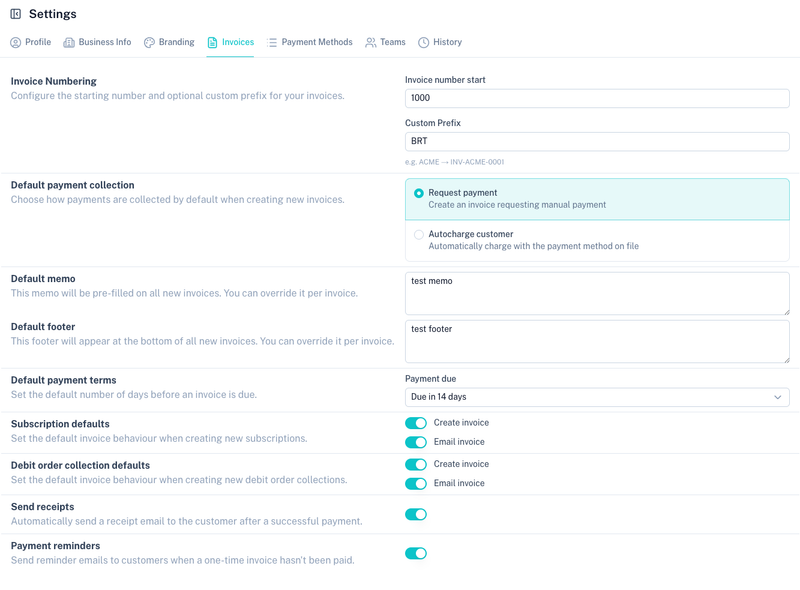
Invoice Numbering
Configure how invoice numbers are generated.
| Field | Description |
|---|---|
| Invoice Number Start | Starting number used when generating new invoices. |
| Custom Prefix | Optional prefix added before the invoice number. |
Example
If the prefix is set to BRT and the starting number is 1000, the first invoice generated will be:
INV-BRT-1000
Default Payment Collection
Choose how invoices should be paid by default.
Available options:
| Option | Description |
|---|---|
| Request Payment | The customer receives an invoice and manually completes payment. |
| Autocharge Customer | Automatically charge the customer's stored payment method when the invoice is issued. |
Note: Autocharge requires a valid payment method to be stored for the customer.
Default Memo
Define a memo that will automatically appear on new invoices.
The memo can be overridden when creating or editing an invoice.
Common uses include:
- Banking details
- Service information
- Customer instructions
- Internal references
Default Footer
Define a footer that will appear at the bottom of all invoices.
The footer can also be overridden per invoice.
Common uses include:
- Terms and conditions
- Company registration details
- VAT information
- Thank-you messages
Default Payment Terms
Configure the default payment due date for newly created invoices.
Available options may include:
- Due today
- Due tomorrow
- Due in 7 days
- Due in 14 days
- Due in 30 days
- Due in 60 days
- Due in 90 days
These settings are applied automatically when creating invoices.
Subscription Defaults
Configure the default invoice behaviour for subscriptions.
Available options:
| Setting | Description |
|---|---|
| Create Invoice | Automatically generate an invoice for subscription charges. |
| Email Invoice | Automatically email the generated invoice to the customer. |
These settings are applied whenever a new subscription is created.
Debit Order Collection Defaults
Configure the default invoice behaviour for debit order collections.
Available options:
| Setting | Description |
|---|---|
| Create Invoice | Automatically generate an invoice for the collection. |
| Email Invoice | Automatically email the invoice to the customer. |
These settings are applied whenever a new debit order collection is created.
Send Receipts
Automatically send receipt emails after successful payments.
When enabled:
- A receipt is generated automatically.
- The receipt is emailed to the customer.
- Customers receive confirmation of successful payment.
Payment Reminders
Automatically send reminder emails for unpaid invoices.
When enabled:
- Customers receive reminder notifications.
- Follow-up emails are sent before or after the due date.
- Outstanding invoices are easier to track and recover.
Branding
Invoice styling is controlled through Branding.
This includes:
- Logo
- Colours
- Email styling
- Invoice appearance
Tips
- Use a custom invoice prefix to separate different business entities or brands.
- Enable receipt emails to improve customer communication.
- Enable payment reminders to reduce overdue invoices.
- Review your default memo and footer regularly to ensure they remain accurate.
- Use Autocharge for customers with stored payment methods to automate collections.