Business Information
The Business Information section contains the information submitted during onboarding and controls how your business appears on invoices, payment pages and customer communications.
Other Settings
Additional account settings can be found under:
Account Limits
View the transaction limits and account settings applied to your account.
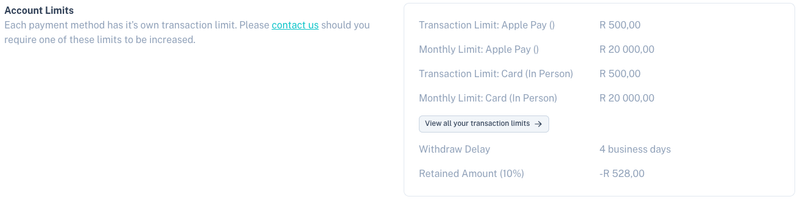
The Account Limits section displays information such as:
| Setting | Description |
|---|---|
| Transaction Limit | Maximum value allowed per transaction for a payment method. |
| Monthly Limit | Maximum processing volume allowed per month. |
| Withdraw Delay | Number of business days before funds become available for payout. |
| Retained Amount | Amount currently being retained according to your account configuration. |
Click View all your transaction limits to view limits for all enabled payment methods.
Note: If you require a limit increase, please contact support for assistance.
Account Details
View your registered business information.

Information displayed includes:
| Field | Description |
|---|---|
| Business Name | Registered business name. |
| Business Type | Legal entity type. |
| Registration Number | Company or business registration number. |
| VAT Number | VAT registration number, if applicable. |
| Industries | Industries associated with your business. |
Note: Some account details can only be updated by contacting support.
Contact Information
Configure your public business contact details.

Available fields include:
| Field | Description |
|---|---|
| Billing Support Email | Email address customers can use for billing queries and invoice responses. |
| Business Website | Public website address for your business. |
These details may appear on:
- Invoices
- Customer emails
- Payment pages
Physical Address
Manage the registered business address associated with your account.
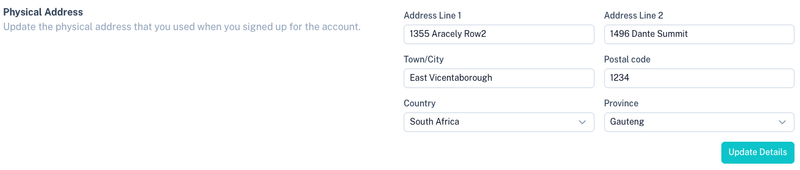
Available fields include:
- Address Line 1
- Address Line 2
- Town / City
- Postal Code
- Country
- Province / State
Click Update Details to save any changes.
Banking Details
Manage the bank account used for payouts.
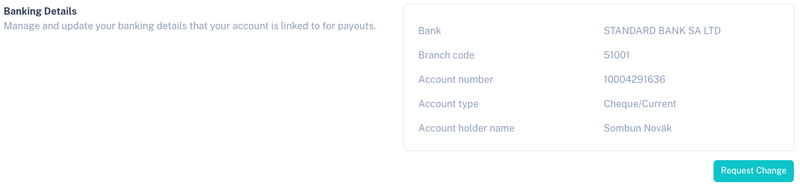
The following information is displayed:
| Field | Description |
|---|---|
| Bank | Bank where payouts will be deposited. |
| Branch Code | Bank branch code. |
| Account Number | Bank account number. |
| Account Type | Type of bank account. |
| Account Holder Name | Name of the account holder. |
Requesting Banking Changes
To update your payout banking details, click Request Change.
For security and compliance reasons, banking detail changes may require:
- Additional verification
- Supporting documentation
- Approval by the Kwik compliance team
Important: Payouts will continue to be sent to the currently approved bank account until the change request has been completed and approved.
Tips
- Keep your billing support email up to date so customers can contact you.
- Review your transaction limits regularly as your processing volumes grow.
- Ensure your banking details remain current to avoid payout delays.
- Contact support if you need to update registered business information that cannot be edited directly.