Settings
History
View a complete audit trail of activity performed within your account.
The History section provides a detailed audit log of actions performed by users within your account.
Every significant action performed in the platform is recorded and can be reviewed for security, compliance and troubleshooting purposes.
What Is Logged
The History section records actions such as:
- User logins
- Team member activity
- Customer updates
- Role changes
- Invoice actions
- Collection updates
- Payment method changes
- Settings updates
- API activity
- Other account-related events
Filtering History
Use the filters at the top of the page to find specific events.
Available filters include:
| Filter | Description |
|---|---|
| Date Range | Filter events within a specific period. |
| Event Type | View specific types of activity. |
| Search | Search historical events. |
History List
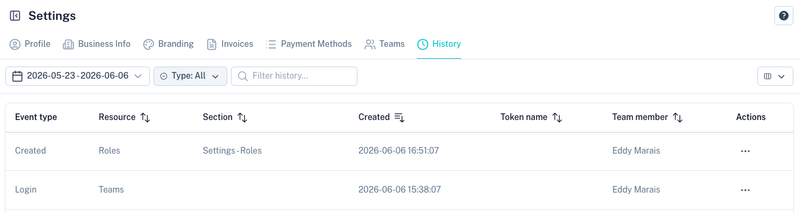
The history table provides a summary of recorded events.
Available columns include:
| Column | Description |
|---|---|
| Event Type | The action that occurred. |
| Resource | The object affected by the action. |
| Section | The area of the platform where the event occurred. |
| Created | Date and time the event occurred. |
| Token Name | API token used for the action, if applicable. |
| Team Member | User who performed the action. |
Viewing an Event
Select an event from the Actions menu to view additional information.
Detailed event information may include:
- User responsible for the action
- Date and time of the event
- Source IP address
- Request metadata
- Previous values
- Updated values
- API token information (where applicable)
This information is useful for:
- Troubleshooting
- Security reviews
- Compliance audits
- Change tracking
Why History Is Important
The audit trail helps you:
- Track who performed a change.
- Determine when a change occurred.
- Investigate unexpected account activity.
- Review administrative actions.
- Support compliance and governance requirements.
Tips
- Review history regularly when multiple team members have access.
- Use filters to quickly locate specific events.
- Investigate unexpected changes using the audit trail.
- Enable 2FA for all team members to improve account security.
- Retain history records for internal auditing and compliance processes.