Payment Methods
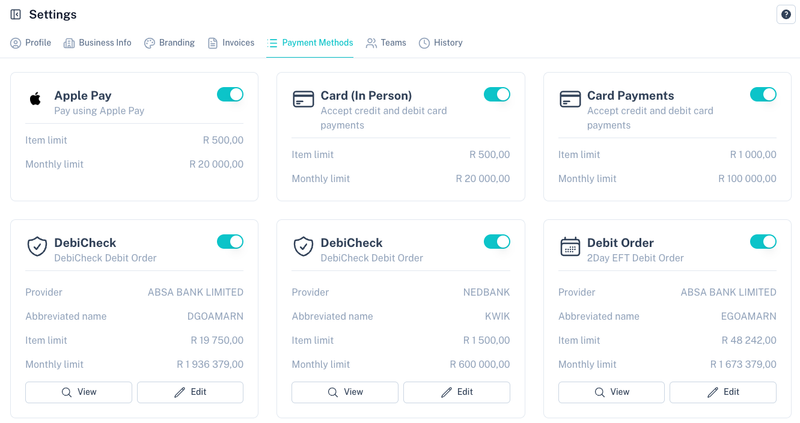
The Payment Methods section allows you to manage which payment methods are available on your account, view transaction limits and configure collection defaults for debit order products.
Enabling and Disabling Payment Methods
Each payment method can be enabled or disabled using the toggle in the top-right corner of the payment method card.
When disabled:
- New transactions cannot be created using the payment method.
- Existing transactions and historical data remain available.
- Existing collections and mandates are not removed.
Viewing Limits
Each payment method displays its processing limits.
Common limits include:
| Limit | Description |
|---|---|
| Item Limit | Maximum amount allowed per transaction. |
| Monthly Limit | Maximum processing volume allowed per month. |
Note: If you require an increase to your limits, please contact support.
Supported Payment Methods
Depending on your account configuration, available payment methods may include:
- Card Payments
- Card (In Person)
- Apple Pay
- Google Pay
- Debit Orders
- Registered Mandates (RM)
- DebiCheck
- Alternative payment methods
Debit Order and RM Defaults
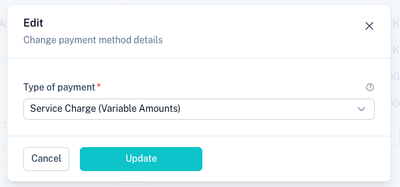
For Debit Orders and Registered Mandates (RM), you can configure default collection behaviour.
Click Edit on the payment method card to open the settings.
Available Settings
| Setting | Description |
|---|---|
| Type of Payment | Defines the mandate or collection category used when creating new collections. |
These defaults are automatically applied when new collections or mandates are created.
DebiCheck Defaults
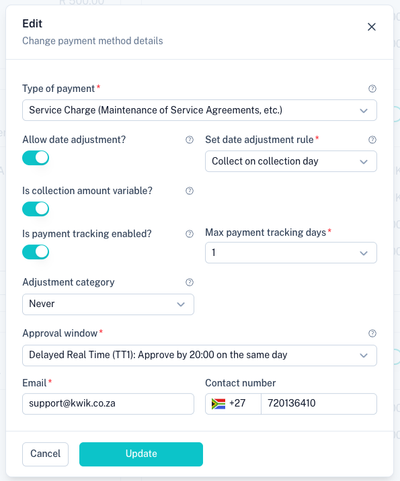
DebiCheck provides additional configuration options that control how mandates are authorised and processed.
Available Settings
| Setting | Description |
|---|---|
| Type of Payment | Defines the DebiCheck payment category used during mandate creation. |
| Allow Date Adjustment | Allows collections to move according to the configured adjustment rules. |
| Date Adjustment Rule | Defines how collections should be adjusted when the collection date falls on a non-processing day. |
| Is Collection Amount Variable | Allows collection amounts to vary between collections. |
| Is Payment Tracking Enabled | Enables collection tracking after the original debit day. |
| Max Payment Tracking Days | Maximum number of days that tracking may continue. |
| Adjustment Category | Defines whether and how collection amount adjustments are permitted. |
| Approval Window | Determines how long the customer has to approve the DebiCheck mandate. |
| Default email address used during mandate communication. | |
| Contact Number | Default contact number displayed during mandate communication. |
These defaults are automatically applied when new DebiCheck mandates are created.
Related Settings
Default invoice behaviour can also be configured under Invoice Settings.
Electronic Mandates created using these payment methods can be managed under Electronic Mandates.
Tips
- Review your limits regularly as transaction volumes increase.
- Configure DebiCheck defaults before creating mandates.
- Keep contact details up to date for customer communications.
- Disable payment methods that are not currently in use.
- Contact support if you require higher transaction or monthly limits.