Terminals
The Terminals section allows you to manage POS devices assigned to your account.

A terminal can be used for:
- Card payments
- DebiCheck TT3 authorisations
- Customer self-service payments
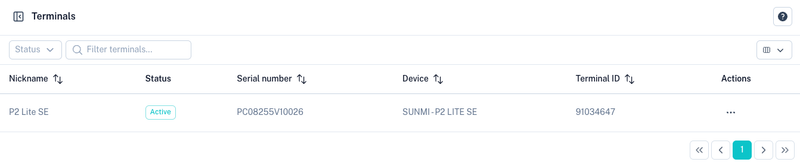
Terminal List
The terminal table displays all devices assigned to your account.
Available information includes:
| Column | Description |
|---|---|
| Nickname | Friendly name assigned to the terminal. |
| Status | Current terminal status. |
| Serial Number | Device serial number. |
| Device | Device model. |
| Terminal ID | Unique terminal identifier. |
Terminal Actions
Open the Actions menu to manage a terminal.
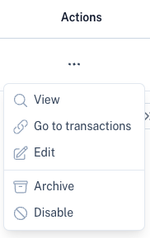
Available actions include:
| Action | Description |
|---|---|
| View | View terminal details. |
| Go To Transactions | View transactions processed by the terminal. |
| Edit | Update terminal settings. |
| Archive | Archive the terminal. |
| Disable | Prevent the terminal from processing transactions. |
Updating a Terminal
Select Edit to configure the terminal.
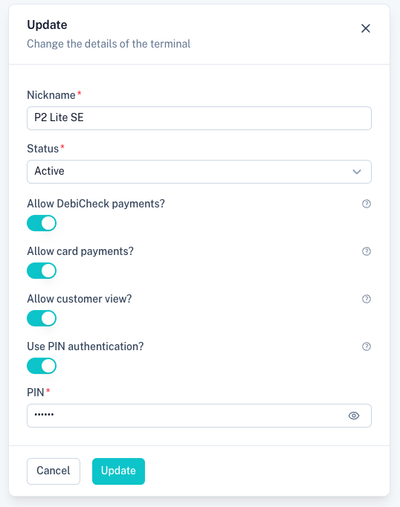
Terminal Settings
| Setting | Description |
|---|---|
| Nickname | Friendly name displayed throughout the platform. |
| Status | Active or disabled status of the terminal. |
| Allow DebiCheck Payments | Allow DebiCheck TT3 mandate authorisations. |
| Allow Card Payments | Allow card payment transactions. |
| Allow Customer View | Enable the POS user to view and create customer records and make payments associated to customers. |
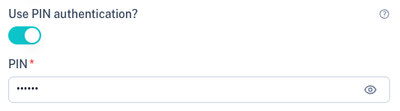
| Use PIN Authentication | Require terminal PIN / OTP authentication before use. |
Terminal Authentication
To improve security, terminals can be configured to require authentication before transactions can be processed.
PIN Authentication
When PIN authentication is enabled, authorised users must enter a PIN before accessing the terminal.
Benefits:
- Restricts terminal access.
- Prevents unauthorised use.
- Suitable for fixed-location devices.
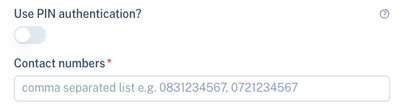
OTP Authentication
When PIN authentication is disabled, one or more mobile numbers can be configured to receive a One-Time Password (OTP).
The OTP must be entered before the terminal can be used.
Benefits:
- Additional security for mobile devices.
- Suitable for shared terminals.
- Allows multiple authorised users to receive authentication codes.
Note: Multiple cellphone numbers can be configured using a comma-separated list.
Ordering a Terminal
If you require a new POS device, a terminal can be ordered and assigned to your account.
Once provisioned, the device will appear automatically in the Terminals section where it can be configured and managed.
Related Sections
Terminal transactions can be viewed under:
Tips
- Enable authentication on all production terminals.
- Use PIN authentication for dedicated users.
- Use OTP authentication when multiple users share a terminal.
- Review terminal permissions regularly.
- Disable terminals that are no longer in use.