Balances
The Balances section provides a complete overview of payouts made to your business, retained funds and payout-related reporting.
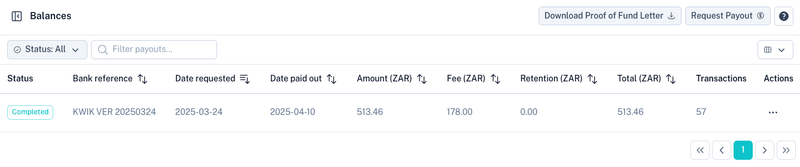
Overview
Each row in the balance table represents a payout request that has been processed or is currently being processed.
The table displays:
| Column | Description |
|---|---|
| Status | Current payout status. |
| Bank Reference | Reference used for the bank payment. |
| Date Requested | Date the payout was requested. |
| Date Paid Out | Date funds were paid into your bank account. |
| Amount | Gross amount included in the payout. |
| Fee | Total fees deducted from the payout. |
| Retention | Funds currently retained. |
| Total | Net amount paid out after deductions. |
| Transactions | Number of transactions included in the payout. |
Use the filters at the top of the page to locate specific payouts.
Requesting a Payout
A payout can be requested from either:
- The Dashboard
- The Balances section

When a payout is requested, all available cleared funds across your enabled payment methods are automatically paid into your registered bank account.
Funds may originate from:
- Card Payments
- Debit Orders
- DebiCheck Collections
- Registered Mandates (RM)
- Alternative Payment Methods
Only settled and available funds are included in the payout.
Note: Funds that are still processing, under retention, disputed or unpaid will not be included until they become available.
Proof of Funds Letter
A Proof of Funds Letter can be downloaded at any time.

This document is commonly requested by:
- Auditors
- Accountants
- Compliance departments
- Financial institutions
The letter provides information regarding:
- Available balances
- Retained balances
- Funds currently held on the account
Retained Funds
A retention is an amount temporarily held to reduce payment risk.
A standard retention of 10% is typically applied to EFT Debit Order collections.
Additional retentions may apply to:
- High-risk industries
- New merchants
- Certain payment methods
- Accounts with elevated dispute or unpaid ratios
Retained funds are released according to the agreed retention terms on the account.
Downloading a Payout Report
Each completed payout contains a detailed payout report.
Open the Actions menu and select Download Report.
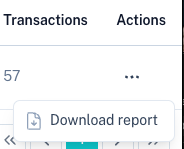
The payout report contains a detailed journal of all transactions included in the payout.
Typical information includes:
- Transactions collected
- Collection dates
- Payment references
- Processing fees
- Retentions
- Settlement amounts
- Net payout calculations
This report is primarily used for:
- Reconciliation
- Accounting
- Auditing
- Financial reporting
Payout Process
The payout lifecycle generally follows the process below:
- A payment is successfully collected.
- The payment completes its settlement period.
- Any applicable retention is applied.
- Funds become available for withdrawal.
- A payout request is submitted.
- Funds are transferred to the registered bank account.
- A payout report becomes available for download.
Related Sections
Your payout bank account can be managed under:
Transaction activity included in payouts can be viewed under:
Tips
- Request payouts regularly to keep balances current.
- Download payout reports for monthly reconciliation.
- Provide Proof of Funds Letters to auditors when required.
- Monitor retained balances when forecasting cash flow.
- Ensure your registered bank account details remain up to date.